
Wealth Manager Email Marketing: Compliance-First Strategies

Email marketing can be effective for wealth managers, but compliance risks often make firms hesitant. A single non-compliant campaign can lead to significant fines. An audit revealing unpreserved communications can result in substantial costs and reputational damage.
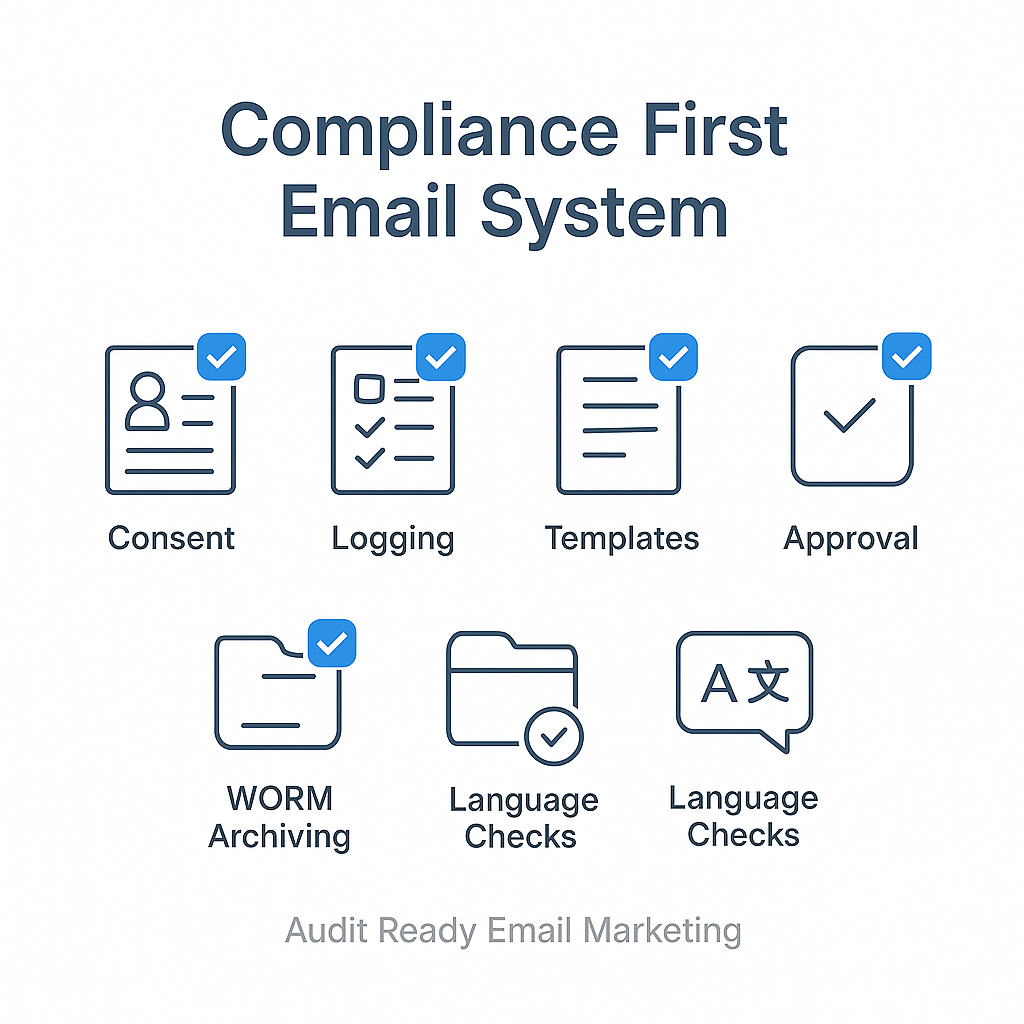
The solution is not to reduce email use, but to build a system focused on compliance. This includes consent logging, pre-approved templates, WORM archiving, and restricted language checks. This approach allows for consistent email communication without legal concerns.
1) Prepare for Compliance Before Sending Emails
Baseline Rules for Every Campaign
Before drafting an email, secure these fundamental compliance elements:
- CAN-SPAM: Maintain honest subject lines, accurate headers, include a physical business address, a prominent unsubscribe link, and honor opt-outs within 10 business days.
- FINRA Rule 2210: Ensure communications are “fair and balanced,” avoiding misleading claims, promissory language, or implied guarantees.
- SEC Rule 17a-4: Retain all email communications in a tamper-proof, write-once-read-many (WORM) format. Retention typically ranges from 3 to 6 years, depending on the record type.
Understand Email Classification
The classification of your email determines which rules apply.
| Email Type | Audience | Pre-Approval Required? |
|---|---|---|
| Correspondence | ≤25 retail investors / 30 days | Supervision required; pre-approval usually not needed |
| Retail Communication | >25 retail investors / 30 days | Written principal pre-approval before first use |
| Institutional Communication | Institutional investors only | Supervision; different review expectations |
Quick test: Audience size + intent + content = classification. Verify this before each send.
Develop a Restricted Language List
Flag these phrases before any email is sent:
- “Guaranteed,” “no risk,” “can’t lose,” “sure thing”
- “Best,” “#1,” “beat the market”
- Any hypothetical performance phrasing implying future outcomes
Create a list of 8–12 restricted phrases with compliant alternatives. For example, replace “guaranteed returns” with “historically, diversified portfolios have shown.”
2) Implement Compliance-Focused List Building
Require Explicit Opt-In
Your opt-in forms must include:
- No pre-checked boxes.
- A clear consent line specifically for marketing emails.
- A link to your privacy notice.
- Stored timestamp, source URL, and the exact consent text shown.
Use Double Opt-In for High-Net-Worth (HNW) Leads
Double opt-in provides confirmed proof of consent. The process is:
- Confirmation email copy: product-neutral, without sales language.
- A single-click confirmation button.
- Confirmation logged with a timestamp for audit purposes.
Specific Implementation for Audit-Ready Logging (Double Opt-In):
Standard platforms can log verification, but for a full audit trail including timestamp, source URL, and exact consent text, additional steps are often needed.
- Customize Consent Text: Ensure the specific consent language is integrated into the confirmation email and signup form.
- Utilize Webhooks, APIs, or Custom Tracking: Implement these for capturing and storing the associated URL, timestamp, and precise consent text.
- Test End-to-End: Test the entire opt-in workflow to ensure all audit-required data points are captured.
Maintain a Clean Email List
- Automatically remove hard bounces.
- Remove unengaged contacts after 90–180 days, sending a re-permission email first.
- Never upload lists without explicit consent.
Purchased lists are not compliant.
3) Create Reusable, Compliant Email Templates
Required Components in Every Email
Every email must include:
- A recognizable sender name (firm name or advisor name).
- An honest subject line that reflects the email content.
- A physical business address (not a PO box).
- A functional and prominent unsubscribe link.
- Firm disclosures and necessary regulatory language.
Three Pre-Approved Template Types
Gain pre-approval for these three template types to streamline future campaigns:
- Educational newsletter: For market insights and planning concepts. Example subject line: “Three things to consider before year-end tax planning.”
- Lead nurture email: For guide follow-up, FAQ answers, and next steps. Example subject line: “Your estate planning checklist: what to review first.”
- Client service email: For meeting preparation, review recaps, and checklists. Example subject line: “What to bring to your portfolio review next week.”
Include Disclosures Clearly
Use two disclosure placements:
- Top disclosure (one sentence): “This email is for informational purposes only and does not constitute investment advice.”
- Footer block: Full regulatory disclosures, firm name, address, and unsubscribe link, presented clearly and readable on mobile devices.
4) Design a Compliance-Focused Funnel for HNW Clients
Offer Educational Lead Magnets
Lead magnets that attract HNW prospects and remain compliant:
- Estate planning meeting checklist: Frame as a preparation tool, avoiding outcome promises.
- Tax-season prep checklist for high earners and business owners: Avoid tax advice claims; encourage consultation with a tax advisor.
- Year-end wealth planning moves guide: Use risk-aware framing; do not imply specific results.
- Business succession planning questions to ask early: Educational questions only; no product recommendations.
Build a 5-Email Nurture Sequence
| Email # | Goal | Core Message | Call to Action | Compliance Check |
|---|---|---|---|---|
| 1 | Deliver resource | Welcome + what to expect | Download/read the guide | No product language; subject line matches content |
| 2 | Educate | Common tax/estate mistakes + fixes | “Here’s what to watch for” | No guarantees; educational only |
| 3 | Build trust | How we work (process only) | “See our process” | No performance claims |
| 4 | Show decisions | Story of decisions made (no numbers) | “Here’s how we think about it” | No guarantees; no client names without consent |
| 5 | Invite | Low-pressure call invite | “Schedule a 15-minute call” | Clear opt-out; avoid urgency pressure |
Add a Client Onboarding Series
A structured 90-day onboarding sequence can reduce churn and manage expectations:
- Send a “what to expect” timeline with key contacts.
- Share secure document upload instructions, emphasizing privacy.
- Explain meeting cadence and what clients should bring.
- Send “questions we’ll cover” addressing goals, risk tolerance, liquidity, estate, and tax coordination.
- Offer a feedback check-in at day 30 and day 60.
If any onboarding email is promotional, include an opt-out. Transactional messages do not require an opt-out.
5) Personalize Without Compliance Issues
Safe Segmentation for Relevance
- Segment by life stage: liquidity event, pre-retirement, retired.
- Segment by client type: business owner, executive, physician.
- Segment by service focus: estate planning, tax coordination, investment management.
Avoid segmentation based on sensitive data unless appropriate consent and security controls are in place.
Personalization Practices for Supervision
- Lock key paragraphs in templates; allow edits only in pre-approved “personal notes” fields.
- Require re-approval if an advisor changes the subject line, adds performance language, or inserts testimonials.
- Maintain a “personalization log” in your CRM: document what was changed, by whom, and the reason for the change.
Specific Implementation for Personalization Log (e.g., Salesforce):
Salesforce Marketing Cloud Personalization and Salesforce Financial Services Cloud (FSC) offer tools for tracking changes.
- Experimentation Log DMO (
ssot__AbnExperimentLog__dlm): Tracks personalization decisions, individual IDs, and experiment IDs. It records the specific personalized content shown, the request datetime, and a tracking key for engagement. This logs changes in experiments, including who made them and when. - Personalization Log DMO: Captures engagement data from personalized sources, including email templates.
- Audit Log: Accessible via “Audits” in the main navigation. Filter by user, object ID, and action type to track changes and approvals.
- Custom Reason Field: Add a custom field (e.g.,
Reason__c) to a custom DMO or via notes to document reasons for approved personalization within email templates. Implement a Salesforce Flow to require this field’s update before personalized content is published.
Implementation Steps:
- Enable Personalization: Within Setup > Account Settings.
- Create Personalization Point: Link email templates, data graph, and rules.
- Run Experiment: Experiments automatically log decisions and treatments to designated DMOs.
- Query DMOs for Reports: Use Data Cloud to query DMOs (e.g., SOQL on
RequestDateTime__c,TreatmentValueText__c,AbnExperimentId__c) for compliance review. - Add Approval Workflow: Integrate a custom field (
Reason__c) on a DMO and mandate its update using Salesforce Flow before publishing personalized content.
6) Use Market Commentary Responsibly
A Four-Part Framework for Compliant Market Commentary
Structure every market commentary email with these components:
- What happened: Present neutral facts, without spin.
- Why it matters: Provide high-level context, avoiding panic.
- What to consider: Offer risk-aware options, but no specific recommendations unless approved.
- Next step: Advise contacts to speak with their advisor or review their plan.
Compliant vs. Restricted Performance Language
| Restricted Phrasing | Compliant Alternative |
|---|---|
| “Our portfolios beat the market last year” | “Markets were volatile; here’s how we approached risk” |
| “Guaranteed 8% returns” | “Historical averages vary; past performance is not indicative of future results” |
| “Our top fund returned 22%” | “Returns vary by portfolio; we focus on long-term planning” |
| “No downside risk strategy” | “Every strategy carries risk; we work to align risk with your goals” |
| “We’ve never had a losing year” | “We focus on consistent process, not short-term outcomes” |
| “Cherry-picked winners speak for themselves” | “We share context around decisions, not isolated results” |
Specific example phrases or disclosures for statements like “historically, diversified portfolios have shown” are not provided as universally pre-approved. Firms should:
- Consult FINRA’s advertising compliance guidance and their compliance or legal department for specific language.
7) Handle Testimonials Carefully
If testimonials are used in emails, three key controls are mandatory:
- Obtain compliance sign-off before use.
- Add required disclosures: who provided the testimonial, any compensation, and whether results are typical.
- Maintain records of approval, source, and dates.
It is generally safer to avoid testimonials in emails. Focus on educational proof instead, such as your process, credentials, and oversight structure, which can be more persuasive with HNW clients.
8) Automate Review, Approval, and Archiving
Minimum Workflow for Every Send
- Draft within a pre-approved template.
- Perform a restricted-language check.
- Route for principal or compliance approval (when required).
- Send only via an approved platform.
- Archive automatically; attach substantiation for any claims.
- Log audience size, version used, and approval ID.
Precise Procedure for Marketing Email Template Pre-Approval:
- Draft Template: Use firm-approved elements and ensure FINRA/SEC compliance.
- Contact Information: Identify the designated approver (e.g., principal or compliance officer) using the firm’s internal directory or approved contact list.
- Submit Request: Send an email with a clear subject line (e.g., “Approval Needed: Marketing Email Template [Template Name/Type]”).
- Required Documents: Attach the following:
- The complete email template draft.
- A compliance checklist or summary of relevant regulatory considerations.
- Details on the target audience and segments.
- Any supporting data or previous approvals, if applicable.
- Set Deadline: Suggest a reasonable deadline for review to manage expectations.
- Approval Timeline:
- For simple reviews with all information provided, expect 1-3 business days.
- For complex templates or those requiring revisions, approval can take up to one week.
- Regular quarterly reviews of existing templates are recommended.
Recordkeeping for SEC/FINRA Standards
- Archive every version: drafts, final sent copy, and associated landing pages.
- Keep proof for every claim: source links and methodology notes.
- Retain in WORM-capable format per SEC Rule 17a-4; follow firm retention schedules (3–6 years).
Platform Capabilities
Look for capabilities such as:
- Email archiving with tamper-proof or WORM support.
- Audit trails showing who approved what and when.
- Role-based permissions.
- CRM logging of consent and interactions.
Platforms like Salesforce FSC offer enterprise-grade capabilities, AppExchange automation, and granular audit trails. Focus on workflows and archiving that meet your compliance needs.
Specific Technical Specifications and Configuration Steps for WORM Archiving:
Salesforce Financial Services Cloud (FSC) provides native and enhanced data archiving capabilities. While not explicitly WORM in the research, it supports compliance through policies and analytics.
Steps for Data Archiving in Salesforce FSC:
- Assess Data: Determine data relevance and retention policies.
- AppExchange Tools: Consider
third-party tools like GRAX for advanced versioning and BigObjects support if native FSC functionality is insufficient. - Define Policies: Establish data retention policies based on criteria (e.g., age of closed cases >3 years, unused data for 12 months) at object and field levels.
- Automate Archiving: Automate processes using Flow for criteria-based scheduling and retention policies.
- Monitor Storage: Use Storage Analyzer for monitoring archived data.
- Set Retention & Permissions: Configure data retention and access permissions, potentially using Salesforce Shield.
- Restore/Search: Ensure the ability to restore and search archived data as needed.
For explicit WORM archiving, especially for email communications, a third-party solution like Smarsh would typically be integrated. The general steps for WORM archiving with such a solution include:
- Establish Domain Name: Ensure correct domain setup.
- Complete Setup Form: Fill out the specific archiving setup form for the chosen solution.
- Submit Form: Send the completed form.
- Configure MX Record: Change the MX record to direct email traffic to the archiving provider’s servers.
- Capture and Ingest: The archiving solution captures emails with metadata and ingests them into its enterprise archive for SEC/FINRA compliance.
9) Pre-Send Compliance Checklist
Execute this checklist before every email send:
- Confirm audience classification: correspondence or retail communication?
- Confirm principal approval if it is a retail communication.
- Verify the subject line matches the email body.
- Verify sender name and reply-to are accurate.
- Confirm a physical business address is included.
- Confirm the unsubscribe link functions.
- Confirm disclosures are included and readable on mobile.
- Remove restricted phrases and implied guarantees.
- Validate all statistics or performance references; save sources.
- Confirm archiving is enabled for this send.
Ten items. Ten minutes. Defensible in any audit.
10) Measure What Matters
Email Key Performance Indicators (KPIs) for Growth
- Reply rate from qualified HNW prospects.
- Meetings booked from email.
- Unsubscribe and spam complaint rate (signals compliance and deliverability).
- Client retention touchpoints completed across the onboarding series.
- List growth from explicit opt-in sources only.
Compliance-Safe A/B Tests
- Subject line clarity , focus on different framing, not hype.
- Call to Action (CTA) wording: “Schedule a 15-minute call” vs. “Reply with ‘review’.”
- Content format: short note vs. structured bullet summary.
- Send time: weekday morning vs. weekend.
- Personal note block: present vs. absent.
Do not test changes to disclosures, performance claims, or regulated language without re-approval. This could lead to a violation.
11) Seven-Day Compliance-First Rollout Plan
- Day 1: Collect required disclosures; build a restricted language list with the compliance team.
- Day 2: Create three core templates; route for pre-approval.
- Day 3: Set up opt-in forms, double opt-in flow, and consent logging.
- Day 4: Build the five-email nurture sequence; route for approval.
- Day 5: Configure email archiving, audit trail, and role-based permissions.
- Day 6: Send internally for quality assurance , check links, unsubscribe, mobile rendering.
- Day 7: Launch to your first segment; log approvals and archive proof.
FAQ
What is the 80/20 rule in email marketing?
The 80/20 rule suggests 80% of your email content should provide value or education, while 20% can promote your services. For wealth managers, this aligns with compliance requirements for fair and balanced content, rather than purely sales-oriented pitches. Prioritize insights, planning topics, and guidance. Keep direct promotion minimal and pre-approved.
What is the 60/40 rule in email?
The 60/40 rule proposes 60% content (education, insights, value) and 40% promotional or conversion-focused material. For regulated advisors, lean more heavily towards content. Educational emails are typically easier to get through compliance review and build trust with HNW prospects who are cautious of sales pitches.
What are the 5 Ts of email marketing?
The 5 Ts are: Tease (subject line for open rates), Target (right segment), Teach (valuable content), Test (A/B testing), and Track (measure success). For wealth managers, “Target” and “Teach” are especially important. Segment your list by client type or life stage, and prioritize education over promotion. The “Track” step should always include compliance metrics, such as unsubscribe rates and spam complaints.
What is the 80/20 rule for financial advisors?
In financial advisory, the 80/20 rule often means 80% of revenue comes from 20% of clients. Applied to email marketing, your top 20% of clients, your HNW relationships, deserve a more personalized, high-touch communication approach. This highlights the importance of segmentation. A well-segmented, compliance-approved email sequence to top-tier clients will generate more meaningful conversations than broad mass emails.
Conclusion
Compliance-first email marketing promotes sustainability. When your consent process is documented, templates are pre-approved, archiving is automatic, and pre-send checks are quick, you can communicate consistently.
Start by implementing the pre-send checklist and getting your five-email nurture sequence approved. This establishes a solid foundation for your email strategy.